From Dynamics 365 to the authority, in seven steps
The platform works on top of your Dynamics 365. Your ledger and master data stay in Dynamics 365. The platform keeps only the documents it sends, the replies and the approvals.
Your Dynamics 365
Finance
Supply Chain Management
Human Resources
Invoices, tax, ledger, pay, items, shipments
D365 E-Reporting SaaS Platform
Peppol network
through a certified access point
State platforms
Poland KSeF, Italy SdI, Romania e-Factura
Tax portals
returns, audit files, registers
Regulators and auditors
ESG, pay, product reports
1 Collect
The platform reads the invoice, the return or the figures from Dynamics 365. Nobody types anything twice.
2 Check
Each country has its own rules: VAT number, mandatory fields, format. The platform checks them before sending, so problems are fixed before the authority sees them.
3 Convert
The document is converted to the format the law asks for in that country.
4 Approve
Where you switch the approval gate on, a person releases the document before it leaves the company. Every approval is logged with name and time.
5 Send
Direct to the state platform or tax portal, through a certified partner, or as a file that you or your adviser upload.
6 Follow
Every document is followed until it is confirmed. Failed sends are retried. What cannot be delivered lands on one worklist.
7 Archive
Each sent file, each reply and each approval is kept for the legal retention period, searchable by document.
What stays where
Your ledger and master data stay in Dynamics 365. The platform keeps only the documents it sends, the replies and the approvals.
Four destinations
Peppol through a certified access point, state platforms such as KSeF in Poland and SdI in Italy, tax portals for returns and audit files, and regulators and auditors for ESG, pay and product reports.
The platform runs on Microsoft Azure in EU regions. Data is encrypted in transit and at rest. Customer data is not used to train AI models.
What you see every day
The seven steps run in the background. What you see is one portal: what needs your attention, what was filed and what is due.
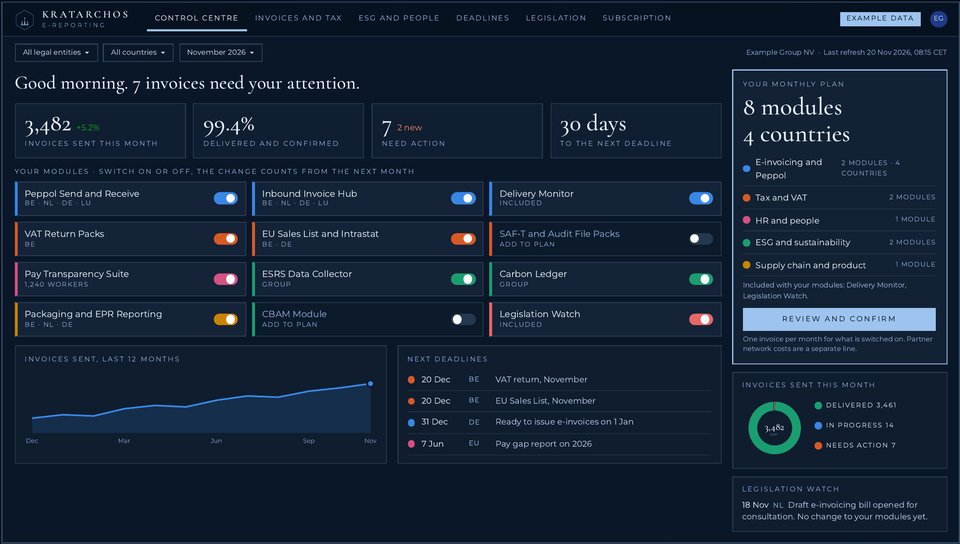
What you see
- What needs your attention today, in one sentence at the top.
- Four figures: invoices sent this month, delivered and confirmed, documents that need action, days to the next deadline.
- Your modules, each with a switch. A change counts from the next month.
- The next deadlines per country, and your monthly plan with modules and countries.
- Legislation Watch: the latest change in the law and what it means for your modules.
Target design of the customer portal. Company, figures and deadlines are examples, not customer data.
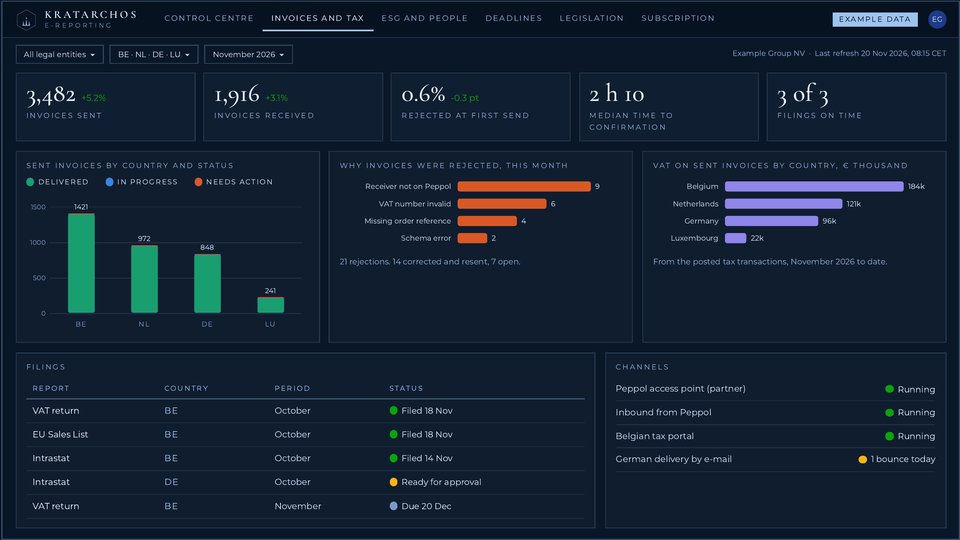
What you see
- Invoices sent and received, the share rejected at first send and the time to confirmation.
- Why invoices were rejected, so the cause can be fixed at the source.
- VAT on sent invoices per country, from the posted tax transactions.
- Every filing with its country, period and status: filed, ready for approval or due.
- The state of each channel: Peppol access point, tax portal, delivery by e-mail.
Target design of the customer portal. Company, figures and deadlines are examples, not customer data.
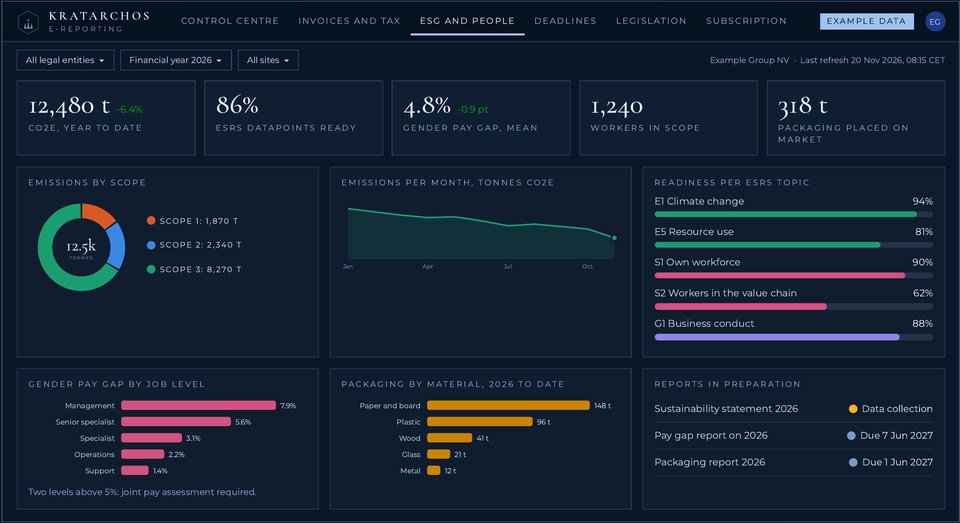
What you see
- CO2e for the year to date, split by scope 1, 2 and 3, and per month.
- How far the datapoints are per sustainability topic.
- The gender pay gap per job level, with a signal when a level is above 5 per cent.
- Packaging placed on the market per material.
- The reports in preparation, with their due dates.
Target design of the customer portal. Company, figures and deadlines are examples, not customer data.
Target design of the customer portal. Company, figures and deadlines are examples, not customer data. Click a screen to enlarge it.
What Dynamics 365 does itself, and what the platform adds
Microsoft delivers the building blocks. The platform uses them and adds what is missing between your Dynamics 365 and the authority.
What Microsoft delivers
- Electronic Reporting: the tool in which formats and reports are configured.
- Electronic Invoicing: 100 submissions a month included, more in packs of 1,000.
- VAT returns, EU Sales List, Intrastat and audit files as files for many countries. Direct filing is documented for Denmark and the Netherlands.
- No link between received e-invoices and vendor invoice automation.
- No pay gap report. No CBAM module in Finance. Digital tagging of reports is left to other tools.
What the platform adds
- The last step: delivery to Peppol, the state platform or the tax portal.
- Country modules where Microsoft lists none.
- One worklist: every document followed until it is confirmed.
- Legislation Watch with a written notice per change.
- Approval before sending, and an archive of every file and reply.
- Reports beyond tax: pay, sustainability, packaging, customs, contracts.
Microsoft sends the e-invoice itself in 6 EU countries, creates only the format in 6 and lists no e-invoicing feature for 15. See it per country on the map.
Source: Microsoft Learn, Electronic invoicing coverage and related pages, read 20 November 2026. Microsoft changes its coverage with each release.
Right on the day the rule applies
Keeping every module current with the latest national legislation and accounting rules is the core of the service.
Watch
We follow the official sources for every country module you use: tax authorities, ministries and law texts. Weekly or monthly, depending on the country.
Verify
Each change is checked against the law text before we act on it.
Notify
You get a written notice: what changes, from when, and what we do about it.
Configure
Dynamics 365 and tax specialists update the module.
Review
A tax and legal check comes before every release.
Test
The change arrives in your test environment first. You send test documents and check the result.
Release
The change goes live after your acceptance. You decide what is filed on your behalf.
Seven steps per change
Watch, verify, notify, configure, review, test and release. No change reaches your live environment without your acceptance.
Who is involved
Tax, legal, accounting, Dynamics 365 and sector specialists review each module before release.
Built and maintained with specialists
Kratarchos Consulting builds and maintains the platform together with a large group of tax, legal and other specialists. They review each module before release, so that it follows the latest national legislation and accounting rules.
Tax specialists
VAT, e-invoicing and tax reporting rules per country.
Legal specialists
Company law, employment law, data protection and contract terms.
Accounting specialists
National accounting rules, audit files and annual accounts.
Dynamics 365 specialists
Finance, Supply Chain, Human Resources and Electronic Reporting.
Sector specialists
Sustainability, pay and product compliance.
Need such a specialist on your own project? Kratarchos Recruitment works with a pool of legal, tax, analysis and IT specialists.
Who does what
What we do
- Follow the official sources for every country module you use.
- Tell you in writing when a change is published, with the date.
- Update the module and put it in your test environment first.
- Keep every sent file, reply and approval.
- Show failed or late documents on one worklist.
- Run the platform in the EU, encrypted, with access per role.
What stays with you
- Stay the legal sender and filer of your invoices and reports.
- Keep master data right: VAT numbers, addresses, items, pay data.
- Approve documents where the approval gate is on.
- Accept a change in test before it goes live.
- Decide with your tax or legal adviser how a rule applies to your case.
The platform keeps modules current with published law. It does not replace your tax or legal adviser, and it is not a guarantee that a company complies with the law.
Six steps to your first module
Analyse
Business process and functional analysis: entities, countries, document flows, volumes.
Connect
The platform is linked to your test environment.
Configure
Modules are set per entity and country.
Test
You send test documents and check the result.
Go live
Per country, on the date you choose.
Run
Monthly subscription, legislation watch, support.
What the monthly fee covers
The platform is a subscription. An analysis comes first. After that you pay per month for the modules that are switched on. You do not pay for a module that is switched off. No surprises on the invoice.
In the monthly fee
- The modules you switched on, for the countries you chose.
- Updates of those modules when the law changes.
- Legislation Watch: a written notice per change.
- Delivery Monitor with every e-invoicing module.
- Each change delivered to your test environment first.
- Support on the modules you use.
Comes on top
- The business process and functional analysis at the start. Scoped and quoted before it begins.
- Custom work, if you ask for it. Scoped and quoted before it begins.
- Network costs of certified partners, such as the Peppol access point. Shown as a separate line.
- Your Microsoft licences. Microsoft includes 100 e-invoice submissions a month and sells extra volume in packs of 1,000.
What sets the fee
- The modules you select.
- The countries per module.
- The term you choose: monthly or yearly.
- Fees are stated without VAT on the order form.
This site contains no prices. Send your countries and modules to info@kratarchos.consulting or call +357 97 95 49 26 for a quotation. Or put your selection together online.
Tell us which countries you invoice in.
We reply with the rules that apply to you, the dates, and the modules that cover them.
+357 97 95 49 26Trade Register ΗΕ 493470 · TIN 60365469R · VAT CY60365469R